
It has been estimated that just under 80% of emails sent by email marketers to people who signed up to your list reach the inbox. This is a pretty staggering number when your recipients have subscribed legitimately. This is because spam filters are becoming increasingly sensitive to make sure that non-legitimate emails do not get delivered. To avoid your email ending up in the spam folder, there are some simple things you can do.

Simplelists offers you a range of options for managing your group email. It’s important to note that we offer free trials for single and multiple list accounts so you may want to use these to carry out a one-off email campaign or have a go at setting up a group list. In this post, we explain the types of accounts in more detail so you can make the right choice to suit your needs.
We have written on this blog before about the importance of email deliverability and what we do to ensure your emails reach their recipients. Spam filters implemented by different email clients (Gmail, Yahoo, Hotmail, etc.) are becoming increasingly sensitive, to make sure that non-legitimate, spam emails aren’t delivered. Ensuring emails are delivered to the inbox is pretty much guaranteed if your list members have 'whitelisted’ you. This means, simply, that you (as the sender) have been added to their list of 'approved’ or 'safe senders’. Different email clients carry out the whitelisting process in different ways and use different terminology. In this short post, we explain how to whitelist email addresses in Gmail.

When you send emails to your list using Simplelists it is possible to insert members’ names into the emails. This personalises the message and allows recipients to see their name in the short email preview they may see in their inbox. This short post explains how to use this feature.

You are no doubt aware that the European General Data Protection Regulation (GDPR) came into force on 25 May 2018. Your inbox was probably full of messages from the various organisations and groups that hold your contact details, checking whether you still wish to receive messages from them and/or updating you about their privacy policy. Our members received an email explaining how Simplelists is complying with the regulation and we have shared that information here on our blog as well.

When you contact the members of your email list, it is likely that your message will include a link to a page on a website designed specifically for them to read more, subscribe and/or visit email archives - this is called a 'landing page’ and these can be generated automatically using Simplelists. So that the page that they land on looks correct and does what you need, you may want to make sure that your list members see your branding or logo when they click through. In this post, we explain how to customise your landing page and share some other top tips for making the landing page 'perfect’.

Simplelists keeps a record of all of the emails that have been sent to your list. This archive can be useful for new list members who might need to quickly get to grips with topics that have already been covered in a private group discussion. It is also a great tool for keeping a back up of all of your communications. If you haven’t already, you can learn how to set up, view and personalise the archive in a recent post on our blog. Below, we explain how to search your email archive, allowing you to find old emails using a keyword search.

Simplelists is designed to be quick, easy and simple to use. It also has a selection of powerful features for users who want more from their email management software. People who sign up to Simplelists do so for many reasons. They may want a way to manage group email discussions, use email for marketing purposes, or send regular updates and other information to list members. We are often asked what Simplelists can do, so this short post is a reminder of our features.

HTML emails are formatted like a web page and can include colours, graphics, tables and links. Most emails that you receive from a shop/business that you subscribe to are likely to use this kind of email. Plain text emails are more like what you might expect to receive from a friend or in a typical work email. Before sending an HTML email to your list, it is worth considering the pros and cons of HTML and plain text emails.
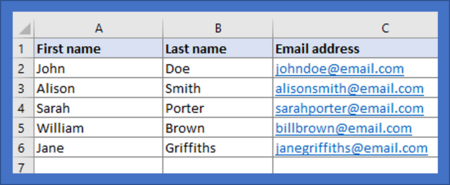
When you start to build an email list you may only have a few members. If this is the case, inputting people’s details manually via the Simplelists members area is straightforward. When your list starts to grow, you may find it helpful to add a large number of subscribers at one time, from a spreadsheet. It is also useful to have a spreadsheet copy of all your list members for your own records. In this short post, we explain how to add members to your list from a spreadsheet.

Having a form on your website that allows people to sign up to an email list is a great way to grow your email list and increase the potential for your messages to be shared beyond your list members. In this short post, we explain what a subscribe form is, how it can work for growing your list, and how to use Simplelists to create a form for your site.

Simplelists is designed to be flexible so that it will suit your needs exactly. You might want to send email newsletters to a list of customers with you alone being able to post to the list. Or, maybe you have a team of people who will all need to be able to send emails to your customers. Or, perhaps you would like to use your list for a private group discussion and you would like anyone on the list to be able to contribute. Whatever your needs, you can customise your list by setting posting permissions. In this short post, we explain how you do this.